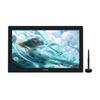
❶ [15.8-inch & 145% sRGB Color Gamut] Dimensions: 436.2 x 247.3 x 10-11.5mm, working area: 349.63 x 196.67mm, weight: 1.28kg, making it easy to carry. Four anti-slip rubber pads on the back provide stability. The 2560 x 1440 (2.5K) resolution is neither too narrow nor too wide. The 145% sRGB color gamut creates an ideal drawing environment. True to the name "Kamvas Pro," it offers a paper-like drawing experience. The IPS panel features a contrast ratio of 1200:1, a wide 170° viewing angle, and consistent brightness and color even when viewed from a distance.
❷ [Android Device Compatible] Thanks to new technology, the Kamvas Pro16 (2.5K) is now compatible with Android devices (USB 3.1 GEN 1, Displayport 1.2 or higher). *For detailed information on USB devices connected to the USB port, please refer to the system information. *A USB-C to USB-C cable is included with this model.
❸ [Improved Pen Tip Sinking & Tilt Detection] The 3.5mm magnetic core inside the pen improves pen tip sinking, making drawing easier than ever! The pen tip supports two types of tips: "standard tip" and "felt tip." The tilt detection function supports up to ±60°, so detection accuracy remains unchanged even when the pen is tilted, providing an even more realistic drawing experience, similar to pen and paper. 8192 levels of pressure sensitivity allow for precise expression. The included PW517 pen requires no charging, so you can create without worrying about running out of battery.
❹ [Full Lamination & Anti-Glare Glass] The fully laminated display features direct bonding, making it not only thinner but also more fully displayed. Touchscreen operation feels like you're touching the screen directly. This ensures LCD panel quality while reducing weight. Anti-glare glass is used to control direct reflection from sunlight and other sources, providing anti-glare properties. The screen is easy to read regardless of room lighting or sunlight, making it gentle on the eyes and reducing eye fatigue even when viewing the monitor for long periods of time. Fingerprints are also less noticeable.
❺ [Shortcut Keys & High Compatibility] Equipped with 8 customizable shortcut keys. Assign various painting software functions to each key to suit your individual work habits. Compatible systems: Android (USB 3.1 GEN 1, Displayport 1.2 or higher), Windows 7 or later, Mac OS 10.12 or later, Linux. Compatible with major painting software such as Clip Studio Paint, SAI, Adobe Photoshop, Comic Studio, Medibangpaint, etc. An adjustable stand for a comfortable drawing angle is not required, eliminating the need to order it separately. For detailed product instructions, please visit the official website. Switch from English to Japanese (toggle the bottom) to obtain both the driver and manual. The warranty period for purchased products is two years from the date of purchase. Please contact us via the official website or via Amazon message. We also provide email and phone support, so please feel free to contact us at any time. Contacting us may result in a quicker resolution.
![[Japan Exclusive] HUION Kamvas Pro16 (2.5K) Deluxe Edition 15.8-inch LCD Pen Tablet with Improved Pen PW517 and Dedicated Stand, Black](https://img.joomcdn.net/e2053e97683a2086623abb0a9235b38f6c7293cd_1024_1024.jpeg)
![[Japan Exclusive] HUION Kamvas Pro16 (2.5K) Deluxe Edition 15.8-inch LCD Pen Tablet with Improved Pen PW517 and Dedicated Stand, Black](https://img.joomcdn.net/8abf3aa55c59b689a0caebaba95cda9b826d0815_1024_1024.jpeg)
![[Japan Exclusive] HUION Kamvas Pro16 (2.5K) Deluxe Edition 15.8-inch LCD Pen Tablet with Improved Pen PW517 and Dedicated Stand, Black](https://img.joomcdn.net/f728a86da88b7a40aebfa7560c899cf24f4e71a0_1024_1024.jpeg)
![[Japan Exclusive] HUION Kamvas Pro16 (2.5K) Deluxe Edition 15.8-inch LCD Pen Tablet with Improved Pen PW517 and Dedicated Stand, Black](https://img.joomcdn.net/fd0591aa92e839c71edde47040229bdafec4043f_1024_1024.jpeg)
![[Japan Exclusive] HUION Kamvas Pro16 (2.5K) Deluxe Edition 15.8-inch LCD Pen Tablet with Improved Pen PW517 and Dedicated Stand, Black](https://img.joomcdn.net/15b9932557e3a6118da1ce2d245224ff7c3a581e_1024_1024.jpeg)
![[Japan Exclusive] HUION Kamvas Pro16 (2.5K) Deluxe Edition 15.8-inch LCD Pen Tablet with Improved Pen PW517 and Dedicated Stand, Black](https://img.joomcdn.net/b9e0eb7efe43b8fdf3aee21ee80453d42bf182e1_1024_1024.jpeg)
![[Japan Exclusive] HUION Kamvas Pro16 (2.5K) Deluxe Edition 15.8-inch LCD Pen Tablet with Improved Pen PW517 and Dedicated Stand, Black](https://img.joomcdn.net/1e31bb02252cb752b225db328bfae938058a0f5f_1024_1024.jpeg)
![[Japan Exclusive] HUION Kamvas Pro16 (2.5K) Deluxe Edition 15.8-inch LCD Pen Tablet with Improved Pen PW517 and Dedicated Stand, Black](https://img.joomcdn.net/a0dbbb001436d1c300e0fe94c367faafac3bec86_1024_1024.jpeg)
![[Japan Exclusive] HUION Kamvas Pro16 (2.5K) Deluxe Edition 15.8-inch LCD Pen Tablet with Improved Pen PW517 and Dedicated Stand, Black](https://img.joomcdn.net/89abfe13be320839e3dd781839bd90a6ff876184_1024_1024.jpeg)


![[Japan Limited] HUION LCD Pen Tablet Kamvas Pro16 (2,5K) Stiloul îmbunătățit de 15,8 inchi ediție de lux PW517 vine cu suport exclusiv negru](https://img.joomcdn.net/e2053e97683a2086623abb0a9235b38f6c7293cd_100_100.jpeg)
![Tabletă cu stilou LCD HUION Kamvas Pro16, ediție de lux, stilou îmbunătățit, PW517, vine cu suport exclusiv negru [numai pentru Japonia] (2,5K) 15.8](https://img.joomcdn.net/4ed744a944c4041eceaa4631791f40acc675f5c2_100_100.jpeg)

![[Doar pentru Japonia] Tabletă cu pen LCD HUION Kamvas 12 Ediție de lux 11,6 inch Pen fără încărcare PW517 pentru desen, procesare foto, Vine cu suport exclusiv](https://img.joomcdn.net/b613401cf44edf372cd05d0b8a7c9ef95e8969c0_100_100.jpeg)